Scrapbook.com Home  Search | View Cart | Wish List | Customer Service  
pad


Shop by Category
Shop by Brand
Shop by Theme
Shop by Color
New Products
Jill's Deals
Hot Products
Clearance
 
pad
Store > Fonts > Lettering Delights Fonts > Fonts - Lettering Delights - Childish (Windows)

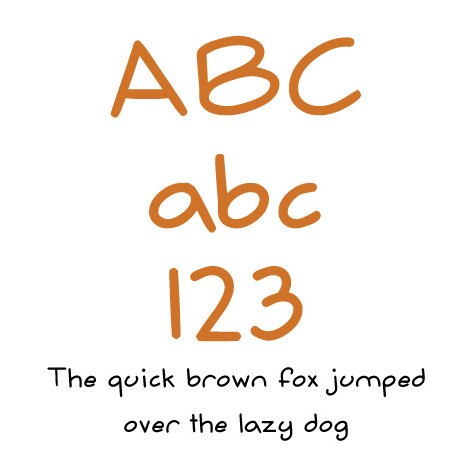
Fonts - Lettering Delights - Childish (Windows)

  Fonts - Lettering Delights - Childish (Windows) - click to enlarge  
pad
Fonts - Lettering Delights - Childish (Windows)
Brand:Lettering Delights
Theme:Misc.
Category:Element Kits
Rating:Retrieving...
Availability:Checking Quantity...
Reg:$5.00
Sale:$1.99
pad
pad Description: pad
pad
Come join the growing numbers of scrapbookers and paper crafters who embellish their layouts with downloadable fonts. Simply download, install the font, and use on your titles, journaling, announcements, invitations, cardmaking and more. Spend a fraction of the time it would take to create your own lettering with computer fonts! Why spend your money on expensive die-cut machines, alphabets, or stencils when you can download a font, change the size, alter the color, and get exactly what you want for any layout every time? Get Scrapbook.com Fonts today!
  • Windows compatible
  • Each True Font includes all English numbers, letters, and the following punctuation: ' " : ; & . , ? !

    Step 1:
    Order your fonts from Scrapbook.com.
    Step 2: Right click on the button after checkout and select "Save Target As...".
    Step 3: Save the file to a location you will remember, or write down where you've saved it. The font file is now saved on your computer.
    Step 4: To install the font, first go to the Windows Control Panel. This is located in your "Start" menu. For some, the Control Panel is found under "Settings" in the "Start" menu.
    Step 5: In the Control Panel, double click on the "Fonts" folder. In Windows XP, you may find the "Fonts" folder under the Appearance and Themes category.
    Step 6:
    From the "File" menu, click "Install New Font...".
    Step 7:
    Select the drive and folder where you saved the file in Step 3.
    Step 8:
    Select the font file from the "List of fonts" and click on "OK".
    Step 9:
    The font is installed on your computer. NOTE: You will need to shut down any open programs and restart in order to use your new fonts.
    SKU: ldchildish
  • pad
    pad Layouts & Projects Using This Product (From the Gallery): pad
    pad pad
    pad Product Reviews & Ratings: pad
    pad pad
    padRelated Products:pad
    pad
    Related Searches:
     Click to Search: Lettering Delights, Misc., Element Kits
    pad
    pad Resources That Reference This Product: pad
    pad pad
    padThis Item is Found in the Following Sections:pad
    pad

    Store > Construct-A-Page > Floorplan 403 > Fonts > Lettering Delights Fonts > Fonts - Lettering Delights - Childish (Windows)

    Store > Shop by Brand > E-Cuts (Printables) > E-Cuts (Printable Scrapbooking Cut-Outs) > E-Cuts - Inspirational / Discovery Collection > Scrapbook.com > Fonts > Lettering Delights Fonts > Fonts - Lettering Delights - Childish (Windows)

    Store > E-Cuts (Printables) > E-Cuts (Printable Scrapbooking Cut-Outs) > E-Cuts - Inspirational / Discovery Collection > Scrapbook.com > Fonts > Lettering Delights Fonts > Fonts - Lettering Delights - Childish (Windows)

    pad
    padMy Recently Viewed Products:pad
    pad
    pad
    pad
     
    My Shopping
    Scrapbook.com Customer Support
    Product Reviews
    Video Demos
    Coupons
    Digital Scrapbooking
    Printable E-Cuts
    Big Picture Classes
    Scrapbooking Featured

    Sign up today for FREE Classes & Coupons!

    Educational
    Digital Scrappin'


    © 2001-2008 Scrapbook.com Neighborhood: The Center of the Scrapbooking WorldScrapbookingtop50 Counter